![Toogethr_Logo_DEF-CMYK (5)-1.webp]](https://support.toogethr.com/hs-fs/hubfs/Toogethr_Logo_DEF-CMYK%20(5)-1.webp?height=40&name=Toogethr_Logo_DEF-CMYK%20(5)-1.webp)
To get the right amount of points for your ride and to access the Toogethr webshop, we ask you to turn on your GPS and give Toogethr location permission.
- How to enable GPS on iPhone
- How to enable GPS on Android
- How to enable high accuracy/high precision on iPhone
- How to enable high accuracy/high precision on Android
iPhone:
- Go to "Settings" on your phone;
- Scroll down until you get to the Toogethr app and tap it;
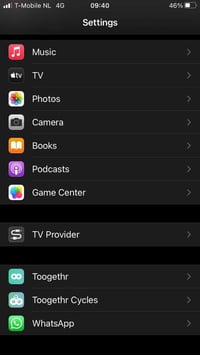
- Tap "Location";
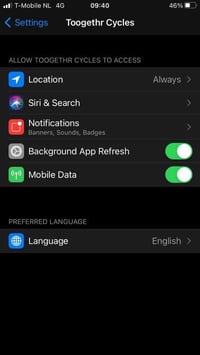
- Tap "Always".
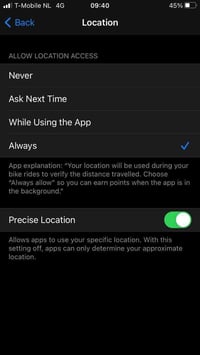
- High accuracy/ high precision
Extra for iOS 14 or higher: go to "Settings" > "Privacy" > "Location Services" > tap the Toogethr app and switch "Precise Location" on.
- Go to "Settings" on your phone;
- Tap "Apps and notifications";
- Tap the Toogethr app;
- Tap "Permissions" and then "Location"
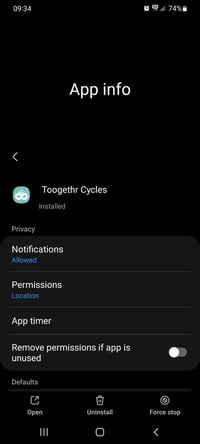
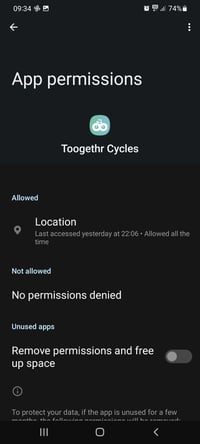
- Choose the option "Allow all the time"
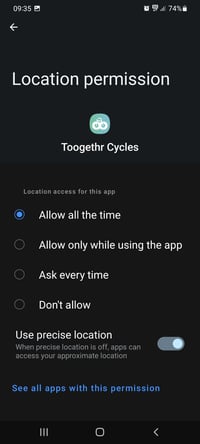
- High accuracy/high precision
Extra: go to "Settings" and then "Location --> location method", here you find 3 options you can choose from: "battery saving, only device and high precision" (they can be called a bit different based on which phone you have). Choose "high precision" for the best app experience.